GPUSmith Article
NVSwitch Fabric Manager CUDA Error 802: A Readiness Ledger
Explainer on NVSwitch Fabric Manager, NVLSM and CUDA error 802 (cudaErrorSystemNotReady): generation matrix, driver/FM version alignment, DCGM 4.5.0 coverage and a 2026 return-to-pool gate.
Summary
- 01CUDA error 802 indicates the system is not ready to start CUDA work. On NVSwitch nodes, check whether the driver is loaded, the required fabric services are running, and the GPUs have registered with the fabric.
- 02H100 uses Fabric Manager, and B200/B300 adds NVLSM to configure switch routing. On B200/B300, the Fabric Manager systemd service status covers both processes.
- 03Record the installed packages and the loaded driver module. Before driver release 620, the Fabric Manager and driver packages must match. Starting with 620, Fabric Manager uses standalone versioning.
- 04Read Fabric State for each expected GPU and check Status once State is Completed. Missing, unsupported or unreadable fabric fields hold the node out of the pool.
- 05Record the DCGM hostengine version and enabled watches, reconcile telemetry with direct observations, and run a bounded CUDA and peer-to-peer canary before admitting the node.
- 06Measure readiness from verified driver load and complete GPU enumeration to the point when all required checks have passed. Count only GPUs on admitted nodes as available capacity.
Inside this article
- 01Executive Summary
- 02Introduction and Background
- 03Taxonomy: Which Services Own Which Generation
- 04Reading CUDA Error 802 and the Fabric Fields
- 05Version Alignment: Package Manifest Versus Loaded Module
- 06Monitoring Capability: What DCGM Can and Cannot Tell You
- 07Evidence Collection, Drain and Return-to-Pool Gate
- 08Data Analysis and Evidence
- 09Implications and Future Directions
- 10Frequently Asked Questions (FAQs)
- 11Conclusion
Executive Summary
CUDA error 802 is the numeric value of cudaErrorSystemNotReady, which the CUDA Runtime API describes as an indication that the system is not yet ready to start any CUDA work [1]. The API reference itself defers to a system-specific user guide and mentions only that required driver daemons should be running. On NVSwitch-connected DGX and HGX nodes, the system-specific guide is the NVIDIA Fabric Manager (FM) user guide: on older platforms CUDA initialization fails if an application launches before FM has fully initialized the system [2], and on H100 and later the CUDA initialization process starts only after the GPUs complete registration with the NVLink fabric [2].
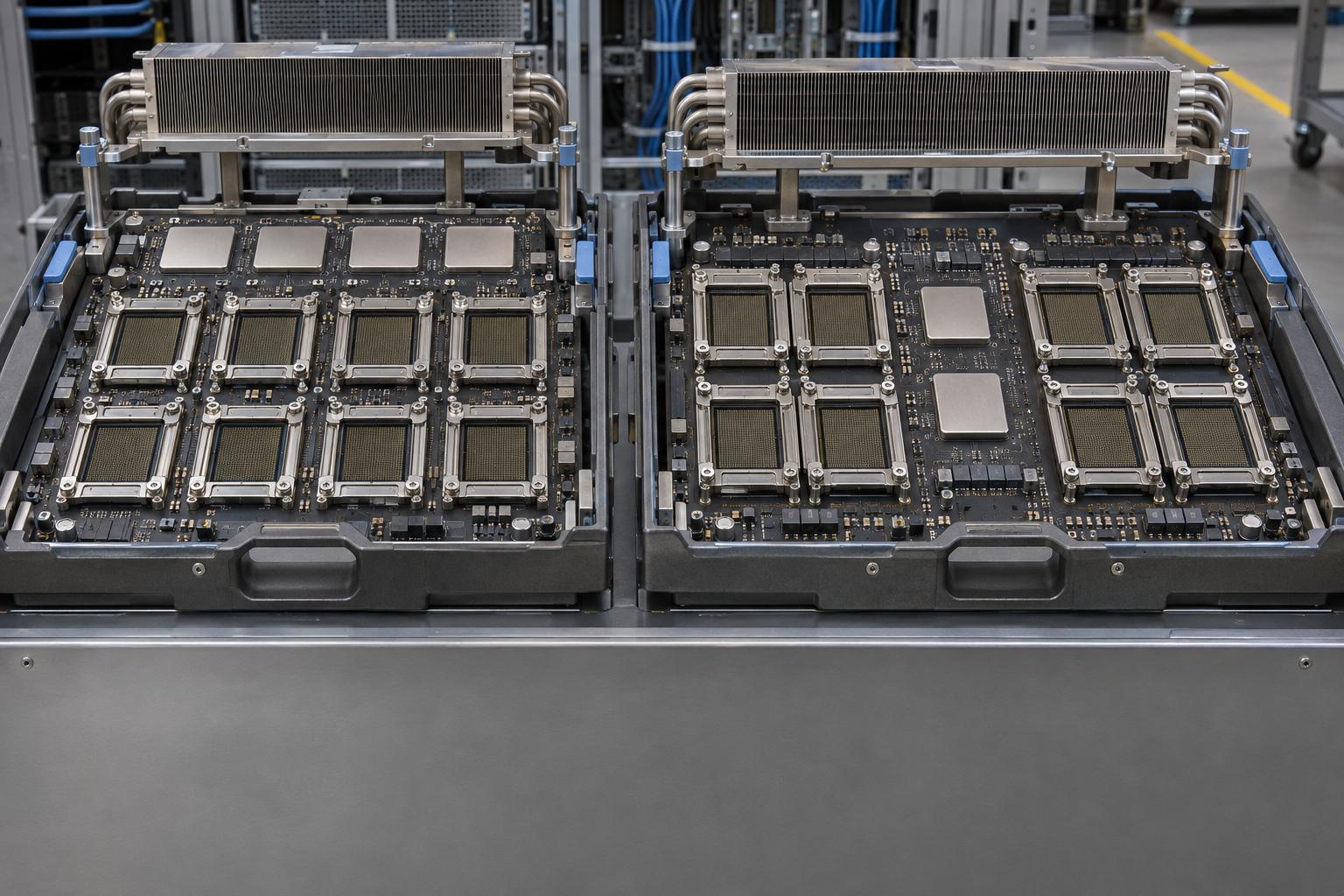
The correct service set depends on generation. NVIDIA documents four generations of NVSwitch. The H100 baseboard carries four NVSwitches; the B200/B300 baseboard carries two NVSwitch ASICs and adds the NVLink Subnet Manager (NVLSM) next to FM [2]. The guide states that one systemd status covers both processes [2]. A running daemon is therefore not a readiness result: stopping FM loses fabric state [2], and recovery after restarting it requires a reset of all GPUs in the fabric.
Version alignment is a documented and common cause of an unready node. For driver releases earlier than 620, the FM package version must match the driver package version [2]; from release 620, FM is versioned standalone. DigitalOcean's troubleshooting page attributes mismatches to package updates made without reloading the kernel module [3]. Monitoring coverage is also version-specific: the DCGM v4.3.1 headers already define the fabric manager status field [4], but the health watch that reads it appears in v4.5.0 source with explicit in-progress, not-started and failed outcomes [5]. A contributor comment on an NVSentinel issue says hostengine 4.5.0 or later detects the cases seen on 4.3.1 [6]; that comment is a lead to verify against the installed hostengine, not a guarantee.
This report proposes a generation-aware readiness ledger that keeps five checks separate: GPU visibility, service liveness, fabric registration, telemetry capability and a bounded CUDA/P2P canary. Readiness time is t(first all-required-checks pass) minus t(driver ready), and available capacity counts only GPUs in admitted nodes that pass the gate. No test or benchmark was run for this report; no boot times or performance floors are asserted, and unknown or unsupported fields are held rather than treated as healthy.
Introduction and Background
A GPU server can enumerate every device and still be unable to run a job. On NVSwitch-connected systems, the question that matters to an operations team is not "are the GPUs visible" but "has the NVLink fabric been brought into a state in which CUDA can initialize and peer-to-peer traffic can flow". The practical audience is private DGX and HGX operations teams, release engineers and acceptance owners who must decide whether a node may enter or rejoin a GPU pool, and which owner (driver and package alignment, fabric registration, management-service ownership, or hardware escalation) should receive a failure.
Published material fragments this task. Application and platform quickstarts treat Fabric Manager as a prerequisite [7], provider pages treat it as an initialization step [8], and the vendor guide treats it as a generation-dependent service model. DigitalOcean's multi-GPU troubleshooting page links directly to the NVIDIA guide and tells readers that "system not yet initialized" errors, including error 802, typically indicate a problem with NVIDIA Fabric Manager [3]. Its commands target an H100x8 platform and should not be assumed to apply to B300 without the generation matrix below.
GPU Smith publishes this article and does not manufacture or host the systems discussed here, and this article is a reference for fault localization, not a restart recipe. Rack-scale IMEX partitions and NCCL benchmark leaderboards are out of scope. The evidence base is first-party documentation, tagged source files and release notes, retrieved in November 2026; where a source is a community discussion, it is used only as a lead and labelled as such.
Taxonomy: Which Services Own Which Generation
The generation split
The FM guide states that NVIDIA introduced four generations of NVSwitch and the associated DGX and HGX systems. The split that matters for readiness is where link training and registration happen. On first- and second-generation systems, FM coordinates with the NVSwitch driver to train NVSwitch-to-NVSwitch NVLink interconnects. On H100 and later, the NVLinks are trained at the GPU and NVSwitch hardware levels without FM; instead, GPUs must register with the NVLink fabric to get NVLink peer-to-peer [2]. A GPU that fails registration loses NVLink peer-to-peer capability, so a node can be partially functional in ways that a simple "FM is active" check will not expose.
FM versus NVLSM
The query "nvidia fabric manager vs nvlsm" has a precise answer in the vendor guide. On fourth-generation systems, a new control-plane entity, the NVLink Subnet Manager, is introduced with FM. NVLSM configures NVSwitch routing tables, while FM handles GPU-side routing. The two communicate through an inter-process communication interface. For operations, the key detail is packaging and lifecycle: on these platforms the FM package carries an NVLSM dependency, the single FM systemd status reflects both processes, and restarting the FM service restarts both. SXid-style NVSwitch error reporting is documented as no longer applicable to B200/B300; DCGM instead uses the NVSDM library to fetch NVSwitch errors. A team that greps for SXid lines on a B200 node is therefore reading a signal the vendor says does not exist on that generation.
Who starts the service
On DGX systems, FM is preinstalled, while on HGX systems it must be installed manually. From driver branch 620, NVIDIA's driver installation guide says FM and IMEX are released independently of the driver and that their services are not enabled automatically. Distribution and provider guides repeat the pattern in their own words: Lenovo's HPC documentation says the FM package is only necessary on 8-GPU HGX configurations [9] and lists NVLSM among the extra packages for B200 [9]; Ubuntu's server documentation says FM and the NSCQ library are only available with the ERD or server driver flavors [10]; AWS's Amazon Linux 2023 guide names P4d, P5 and P6 as GPU instance families that require FM [11], and its EFA guide says G-series instances use no NVSwitch and need none [12].
Ownership also changes under Kubernetes. With default settings, the NVIDIA GPU Operator deploys drivers as a container, and the GPU Operator release notes say that on NVLink 5 or later nodes the GPU driver container starts the NVLink Subnet Manager (NVLSM) service alongside NVIDIA Fabric Manager; confirm this against the release notes for your pinned Operator version. The Operator's KubeVirt documentation splits instructions by how the driver is installed [13] and says an Operator-managed driver container configures and starts FM. Whether a host systemd unit and an Operator-managed container may coexist on one node is a question to resolve with the OEM and the pinned Operator release, not a configuration to assume.
Generation matrix
Table 1 below summarizes the services, the registration mechanism, the status source, current monitoring support and recovery scope by generation. It is a ledger template as much as a summary: cells marked "unknown" must be filled from the exact platform guidance before a node class is admitted.
| Generation / platforms | Required services | Initialization and registration | Status source | Monitoring capability (version-dependent) | Recovery scope |
|---|---|---|---|---|---|
| Gen 1-2 (HGX-2, HGX A100) | Kernel driver plus FM | FM trains NVSwitch links | Application launch before FM initializes returns cudaErrorSystemNotReady | Unknown until DCGM version and watches are inventoried | With FM stopped, GPUs cannot be individually reset; reset all GPUs and NVSwitches [2] |
| Gen 3 (HGX/DGX H100 class) | FM; four NVSwitches per baseboard | Hardware link training without FM; GPUs register with the fabric | Fabric State and Status via NVML and nvidia-smi -q | DCGM health-watch fabric check present in v4.5.0 source [5]; not in v4.3.1 per contributor [6] | Bare metal: a GPU can be individually reset; virtualized modes depend on hypervisor permissions (unverified here) |
| Gen 4 (B200/B300, B100) | FM and NVLSM; two NVSwitch ASICs | Same registration concept; NVLSM programs switch routing | Same NVML fields plus NVLSM and FM logs; SXid not applicable | NVSDM-based switch error path in DCGM; fabric health mask field in v4.5.0 header [14] | FM restart restarts NVLSM; platform-specific reset order must come from the OEM |
| Rack-scale (NVL72 class) | Out of scope | Not validated here | Not validated here | Not validated here | Not validated here |
The matrix should be read with its limits in view. It lists documented behavior, not tested behavior, and the cells for virtualized modes and for gen 4 reset order are deliberately left to OEM guidance. One consequence is that a generic "restart FM" step cannot be written for every row: the vendor warns that stopping FM loses fabric state and gives a distinct reset sequence for H100 and later that begins by halting CUDA applications and services such as DCGM. It also says restarting the service intermittently is unnecessary.
- The baseboard has four NVSwitches and requires Fabric Manager.
- GPU and switch hardware train the links. GPUs register with the fabric for NVLink peer-to-peer.
- The baseboard has two NVSwitch ASICs and uses both Fabric Manager and NVLSM.
- NVLSM configures switch routing tables. Fabric Manager handles GPU-side routing.
- One Fabric Manager systemd service reports status for both processes, and restarting it restarts both.
Reading CUDA Error 802 and the Fabric Fields
What 802 does and does not say
The CUDA Runtime API entry is generic: the system is not yet ready to start CUDA work. It does not name FM. The NVIDIA NIM troubleshooting page for CUDA driver errors is more specific: the NIM page lists error 802 as meaning that the NVIDIA kernel driver is not loaded or fabric manager is not running, which is required on NVSwitch systems like DGX A100/H100. That gives three candidate owners for an 802: driver load state, FM or NVLSM service state, and fabric registration. A fourth, FM running but unable to initialize, appears in the vendor guide's setting that keeps FM resident after failures: the system will then be uninitialized and CUDA application launches will fail. In other words, "service active" and "CUDA works" are different facts. The guide also notes that the setting that aborts CUDA jobs when FM exits is not effective on H100 and later systems.
Fabric State and Status
The practical observation point is the Fabric section of nvidia-smi -q. DigitalOcean's page uses nvidia-smi -q | grep -A 2 Fabric [3] and treats the node as not initialized unless all eight GPUs report Completed or Success [3]. The nvidia-smi documentation lists four possible State values: Completed, In Progress, Not Started and Not supported [15], and describes the field as the state of the GPU's handshake with the fabric manager. NVML's structure documentation adds that the Status field must be checked only if the probe state returns complete [16]. That sentence yields a rule for the ledger: State and Status are a pair, and Status is meaningless while State is In Progress or Not Started.
Two limits matter for "unknown, never healthy". First, "Not supported" has platform-specific meaning: NVML scopes the fabric query to Hopper or newer fully supported devices [17], so the value is an expected observation on an A100-class system and an unexplained one on an H100-class system. Second, the Cluster UUID field is documented as zero on NVLink single-node systems, so an all-zero value on an eight-GPU HGX box must not be read as a missing registration. A third limit is documentary: the nvidia-smi page also lists the deprecation of fabric State and Status output in a notice for a recent version range, while current vendor and provider pages still show those fields. Operations teams should record the exact nvidia-smi and driver versions with every capture and treat a missing field as unknown.
Fault localization in four steps
- Visibility: can the node enumerate every expected GPU by UUID and PCI bus ID? This says nothing about the fabric.
- Initialization: is FM (and on gen 4, NVLSM) running under the expected owner, with logs at INFO level, which NVIDIA recommends for troubleshooting?
- Registration: does each GPU report State Completed and Status Success, with no field missing or unsupported?
- Degradation: are there link or switch conditions visible through the supported source for this generation (NVLSM and FM logs, NVSDM-backed DCGM counters), distinguishing the internal NVLink substrate from external InfiniBand or RoCE networks?
The last distinction matters because the guide states that using InfiniBand tools over the CX interface is not supported on B200/B300 systems, and because the vendor describes NVLink Network endpoints (multi-node) as not sharing a common memory address space, unlike intra-node NVLink [18]. Neither external fabric status nor rack-scale status substitutes for the node-local fabric check.
A GPU that fails registration loses NVLink peer-to-peer capability, so a node can be partially functional in ways that a simple "FM is active" check will not expose.
Version Alignment: Package Manifest Versus Loaded Module
The documented constraints
For driver releases earlier than 620, the FM package version must match the driver package version. Starting with release 620, FM is versioned standalone with its own semantic version beginning at 2.0.x, and the FM user guide's document history records the change in its September 2026 revision. At startup, FM checks driver compatibility and aborts if the loaded driver stack version is not compatible; on earlier platforms it stops and reports that the library version is not supported when the library and FM differ. NVIDIA's installation guide also warns that independently released packages can remain installed alongside an incompatible older driver after a downgrade, and it offers version-locking packages that align all driver packages to the same branch. DGX OS 7 documentation says the driver and the corresponding NVLink stack packages must be updated simultaneously. Talos Linux's extension documentation uses the same rule in a container-image context: the FM extension version has to match the driver version in use [19].
Package versus loaded module
The most common mismatch pattern documented by a provider is a package update without a reload. DigitalOcean says mismatches commonly occur after updating installed packages without restarting or reloading the kernel module, shows a log line asking for a matching driver package, and recommends updating the two together. Its fix for a newer FM is to install the exact older FM package, and it notes that the matching package suffix is often but not always the same. The ledger must therefore capture both sides of the comparison: the package manifest (what the package manager says is installed) and the running module (what the kernel has loaded). NVIDIA's installation guide tells operators to verify that the correct driver version is loaded and notes that a reboot is needed to load new kernel modules; the driver README says /proc/driver/nvidia/version lists the installed driver revision [20]. The standard Linux tools modinfo and lsmod cover the module file and the loaded module respectively [21] [22], and apt-mark hold is the standard Debian-family mechanism for freezing packages while a window is planned [23].
Table 2 is a blank running-module versus manifest ledger. It contains no invented values: every cell is filled by the operator from the node under test.
| Node / generation | Loaded driver (full version, from running module) | Driver package (manifest) | FM package | NVLSM package (gen 4) | Rule applied (pre-620 exact match, or 620+ standalone) | Match? |
|---|---|---|---|---|---|---|
| node-id | filled by operator | filled | filled | filled or n/a | filled | yes / no / unknown |
The table is only useful if "Match?" has three states. An empty or unreadable cell is "unknown", and unknown holds the node out of the pool. Because the 620 boundary changes the rule, the "Rule applied" column prevents an auditor from applying the pre-620 exact-match rule to a standalone-versioned FM or the reverse.
Monitoring Capability: What DCGM Can and Cannot Tell You
Installed hostengine, not exporter version
NVIDIA Data Center GPU Manager (DCGM) exposes a fabric manager status field. The v4.3.1 header already defines it [4], so field presence does not prove that a health check consumes it. In v4.5.0 source, the health module reports separate strings for training in progress [5], training not started [5] and training failed [5], and the DCGM 4.5.0 release notes describe added detection and reporting of multiple fabric health conditions [24]. The vendor user guide lists a non-ready fabric state as an NVLink failure condition. This report's comparison of the tagged v4.3.1 and v4.5.0 health-module sources found no reference to the field in the older file, which is consistent with the NVSentinel discussion statement that DCGM 4.3.1 has no fabric health check [6].
That discussion is a lead, and it is version-specific. It was opened on February 18, 2026, and is now shown as closed as not planned [6]. A contributor comment dated October 19, 2026 says both cases in the issue are detected when the DCGM hostengine is 4.5.0 or later [6], and that the NVLink health watch checks field 170 [6]. The contributor's validation was an injection test, with the field injected on an 8x H100 NVSwitch host running DCGM 4.6.1 [6]; the node was uncordoned when the injected value returned to Success. An injected value shows that a downstream pipeline reacts to the field. It does not show that a native fabric fault reaches the field. The ledger should treat the result as supporting evidence for the monitoring path, not for the fabric.
Where the hostengine lives
The monitoring version is the version of the hostengine process that answers queries. The DCGM exporter README says to run the exporter with its paired DCGM version [25]. An exporter on a new version pointed at an older hostengine is therefore still limited by the older hostengine. In Kubernetes, the NVSentinel discussion describes FM either as a host systemd service or as a child process in the GPU Operator driver container, which is why ownership is an inventory field.
Enabled watches and their limits
A health check must be enabled to run, and DCGM watches live in the hostengine: they are not durable across a host-engine restart and must be set again [26]. The dcgmi health --check operation evaluates retained samples and runs no active diagnostic, and DCGM's health module does not apply load. The exporter's default counters file ships the fabric manager status line commented out [27], so a dashboard built on defaults may not carry the field at all. The conclusion is not that DCGM is unreliable. It is that a green DCGM status is one input, and the ledger reconciles it with direct per-GPU observations and a bounded canary.
- The header defines the Fabric Manager status field.
- The tagged health-module source reviewed in the article has no reference to the field.
- The health watch reads the field and distinguishes training in progress, not started and failed.
- The release notes describe added detection and reporting of multiple fabric health conditions.
Record the installed hostengine version and enabled watches, then reconcile their status with direct per-GPU observations and the bounded canary.
Evidence Collection, Drain and Return-to-Pool Gate
Collect before changing state
Because stopping FM loses fabric state, and a reset may erase what a failed node still shows, capture first. A boot or rejoin evidence set contains:
- Inventory: GPU UUID and PCI bus ID list, node and baseboard generation, OS and kernel, and for B200/B300 the kernel version, since the guide states that those systems require Linux 5.17 or later and an OFED or MOFED driver.
- Versions: the loaded driver, driver package, FM package, NVLSM package and hostengine version (Table 2).
- Fabric state: per-GPU State and Status in one capture.
- Logs: the FM log and journal for the boot, since the guide's default logging is configurable and NVIDIA recommends INFO level;
journalctl -bselects messages from a specific boot [28]. - Ownership: which process tree starts FM and NVLSM (host systemd or Operator container).
- Timestamps: monotonic timestamps. systemd records both realtime and monotonic timestamps for unit transitions, with zero meaning the transition has not been recorded on this boot [29].
A systemd unit being "active" is also not a readiness signal on its own: unit start semantics depend on the service type, and only some types let a service signal when startup is complete [30]. Kubernetes draws the same distinction between liveness and readiness. Liveness decides when to restart [31]; readiness decides when a container may accept traffic [31]. A node-level equivalent belongs in the ledger.
Drain and scope before corrective action
Corrective actions on H100-and-later systems begin with halting CUDA applications and services using the GPUs, which means workloads must leave the node first. In Slurm, the DRAIN state indicates no new jobs may start while existing jobs run to completion [32]; in Kubernetes, marking a node unschedulable prevents new pods from being placed there [33], and a drain can respect PodDisruptionBudgets [34]. Cordoning is a preparatory step before reboot or maintenance [33], not a recovery. The drain blast radius is the node, because the vendor's recovery requires a reset of all GPUs in the NVLink fabric after FM is restarted. After the maintenance scope is approved, the OEM-supported service, reload and reset order for the identified platform applies. Reset semantics differ by generation: with FM not running on Ampere NVSwitch systems, individual GPU reset is not possible; the nvidia-smi documentation says Fabric Manager is required to facilitate reset on Ampere NVSwitch systems and that the dependency was removed on Hopper and later; on Hopper bare metal a GPU can be individually reset. Virtualization modes add their own rules: FM runs in modes for bare metal or passthrough, shared NVSwitch multi-tenancy and a dedicated trusted service VM, and each needs separate validation.
The bounded canary
Direct CUDA execution is the final check. A bounded canary should allocate memory and launch a kernel on every GPU, then exercise a supported P2P path. The CUDA runtime exposes a query for whether one device may directly access a peer's memory, and NVIDIA's simpleP2P sample demonstrates P2P copies [35]. NVIDIA's nvbandwidth can restrict device-to-device tests to a specified GPU pair [36], with a small buffer that is sufficient for quickly verifying connectivity [36]; it reports measured bandwidth on the system tested, not a pass threshold. nccl-tests checks both performance and correctness [37] and documents a single-node eight-GPU run [37]. NCCL's environment variable documentation includes a P2P level setting (NCCL_P2P_LEVEL) whose NVL value uses P2P when GPUs are connected through NVLink, which can be used to make an NVLink path explicit in the canary. This report states no bandwidth floor: the pass criterion for correctness comes from the tool exit status, and any performance criterion comes from the OEM statement of work or a local baseline.
Return-to-pool gate
Return to pool is a per-node decision with explicit evidence. Schedulers help but do not decide it: Slurm can run a health-check script periodically as root [38], and its ReturnToService setting controls when a DOWN node is returned to service [38]. Neither knows about fabric registration unless the script checks it. A node is admitted only when every line below holds:
- Per-GPU fabric state: every expected GPU shows State Completed and Status Success in one capture; any unsupported, missing or unreadable field is unknown, and unknown holds the node.
- Versions: the Table 2 row is complete and "Match?" is yes under the rule for the installed branch.
- Services: FM (and NVLSM on gen 4) is running under the single identified owner, with no unresolved relevant fault in the boot's logs.
- Canary: the representative CUDA allocation and kernel run on all GPUs, and the supported P2P or collective check passes with the exit status recorded.
- Telemetry: the installed hostengine version and enabled watches are recorded, and its status is reconciled with the direct observations.
- Timing: readiness time is computed from the definitions in the next section and is within the OEM or locally baselined timeout; if no timeout is defined, the node is held for review.
- Signoff: a named operator accepts the evidence and records the maintenance scope that was used.
- 01Confirm versions
Complete the loaded-driver and package ledger and confirm a match under the rule for the installed branch.
- 02Verify service ownership
Check that Fabric Manager and, on gen 4, NVLSM run under the single identified owner. Verify that this boot has no unresolved relevant faults in the logs.
- 03Check fabric registration
Capture State and Status together. Every expected GPU must report State Completed and Status Success.
- 04Reconcile telemetry
Record the installed hostengine version and enabled watches, then reconcile the telemetry status with direct observations.
- 05Run the bounded canary
Run the CUDA allocation and kernel on every GPU. Verify a supported peer-to-peer or collective check and record the exit status.
- 06Verify timing and sign off
Check readiness time against the OEM or locally baselined timeout. Have a named operator accept the evidence and record the maintenance scope.
Admit the node once every required check passes and a named operator accepts the evidence.
Hold the node when a required check fails, a required field is unknown, or no readiness timeout is defined.
Where a field is missing, unsupported or unreadable, the entry is unknown and the node waits outside the pool.
Data Analysis and Evidence
Platform numbers that scope the ledger
The quantitative facts in the vendor material define how many checks a node needs. NVIDIA's Hopper in-depth article says H100 includes 18 fourth-generation NVLink links for 900 GB/s of total bandwidth [18], and that each third-generation NVSwitch provides 64 NVLink ports [18]. The Ampere article gives 600 GB/s across 12 links for A100 [39]. The DGX B200 user guide lists two fifth-generation NVLink switches providing 14.4 TB/s of aggregate bandwidth, consistent with the FM guide's two NVSwitch ASICs per baseboard. The DGX H100 guide lists eight GPUs and 640 GB of total GPU memory, and NVIDIA's HGX page describes a single baseboard with eight SXM GPUs [40]. For the ledger, the useful numbers are counts: eight GPUs per baseboard means eight State/Status pairs per node, four NVSwitches (H100) or two (B200/B300) to account for in switch-side logs.
Readiness time arithmetic
Readiness time is measured with explicit boundaries. The definition used here is:
- t_driver_ready: the monotonic timestamp at which the loaded driver is verified and the GPU enumeration is complete.
- t_fabric_ok: the first monotonic timestamp at which all required per-GPU fabric checks pass (State Completed, Status Success, no unsupported or missing field).
- t_canary_ok: the first timestamp at which the bounded CUDA allocation, kernel and P2P canary pass.
- t_all_pass: the later of t_fabric_ok, t_canary_ok and the timestamp at which the required telemetry coverage check passes.
- Readiness time = t_all_pass minus t_driver_ready, measured within one boot or rejoin window with the observation start and stop recorded.
(Hypothetical Example) If a node's driver is verified at monotonic time 100 s, fabric checks all pass at 140 s, the canary passes at 155 s and telemetry coverage passes at 150 s, then t_all_pass is 155 s and readiness time is 155 minus 100, or 55 s. These figures are invented to show the arithmetic. They are not boot-time measurements, and no public benchmark of this interval was found in the sources reviewed. Teams should accept as timeout criteria only values from the OEM statement of work or from their own baselines, and hold any node that has not passed by the agreed timeout.
Capacity arithmetic
Available capacity counts only GPUs in admitted nodes that pass the gate. With N nodes, each with G enumerated GPUs, and A of those nodes admitted:
- Enumerated GPUs = N x G.
- Ready GPUs = A x G, because the fabric gate is per node (reset and registration are node-wide under the vendor's recovery description).
- Enumeration-to-ready gap = (N minus A) x G.
(Hypothetical Example) With 12 nodes of 8 GPUs, enumeration shows 96 GPUs. If 10 nodes pass and 2 are held with State In Progress, ready capacity is 10 x 8 = 80 GPUs and the gap is 16. A partial-GPU admission is outside the vendor evidence reviewed here: a GPU that fails registration loses NVLink peer-to-peer, so any admission of such a node must be a documented exception.
Blank ledger template
One row per node per boot or rejoin window. Fields are left blank for the operator; nothing below is a measured value.
- Identity: node ID, server model, GPU model, NVSwitch generation, baseboard count.
- Software inventory: OS, kernel, loaded driver, packages (Table 2), hostengine version, management-service owner.
- Boundaries: boot ID, t_driver_ready, t_fabric_ok, t_canary_ok, t_all_pass (monotonic), observation start and stop.
- Per-GPU rows (one per UUID): PCI bus ID, Fabric State, Fabric Status, source command and tool version, capture time.
- Logs: FM and NVLSM log paths, relevant lines retained, unresolved faults (yes, no or unknown).
- Canary: tool, version, command, GPUs covered, exit status.
- Disposition: admitted, held or escalated, owner from Table 3, approver.
Symptom, evidence and owner
Table 3 maps observations to evidence and the likely owner. The owner column is a routing hint to be confirmed with the OEM, not a diagnosis.
| Symptom | First evidence to capture | Likely owner |
|---|---|---|
CUDA init returns 802 while nvidia-smi lists all GPUs | Service state and logs for FM (and NVLSM on gen 4); per-GPU Fabric State and Status | Management-service ownership |
| Fabric State In Progress or Not Started on one or more GPUs | FM and NVLSM logs; boot ordering; process owner (host or Operator) | Fabric registration |
| FM refuses to start; log asks for a matching driver package | Loaded driver full version, driver package, FM package | Driver and package alignment |
| State Completed but Status not Success, or Status unreadable | Status code, nvidia-smi version, NVML fields | Unknown until status is classified; hold |
| State Not supported on an H100-class or newer node | Driver and NVML versions; platform guide | Unknown; hold |
| DCGM health green but fabric fields not Completed | Installed hostengine version, enabled watches, exporter counters [27] [6] | Monitoring configuration |
| Fabric fields pass but canary P2P fails | Canary output, topology matrix, NVLink link status | Escalate to OEM hardware support |
The table's use is routing. The first three rows are resolved with local changes, while rows four to six reveal observation gaps that keep the node out of the pool until classified, and the last row is the one that most plausibly leaves the local team's scope. A scientific caution applies to all of it: no independent test was performed for this report, and published evaluations of GPU interconnect behavior [41] address microbenchmarks, not readiness gates.
Implications and Future Directions
Three implications follow for acceptance owners. First, the platform matrix has to be versioned: the 620 boundary changes the version rule, and the FM guide's document history records independent FM versioning in its September 2026 revision. A ledger that records the guide revision used for each node class will age better than a runbook that copies commands. Second, monitoring claims must be re-verified when the stack changes. The DCGM 4.5.0 health-watch change is one reason to record hostengine version and enabled watches with every readiness result; an old finding can lose its relevance the moment a component is upgraded. Third, ownership must be explicit. Provider and distribution documentation make FM a prerequisite in several ways [7] [42] [8], and the Operator documentation distinguishes pre-installed from Operator-managed drivers. The article does not recommend running both management paths at once. That is a question for the OEM and the pinned Operator release.
For procurement and acceptance, a useful framing is an SOW that asks the vendor for the per-generation service matrix, the supported recovery order and the pass criteria; these give later fault localization something to point to. This position is advisory and unmeasured; no conversion or client outcome is implied.
Open items remain. The exact reset order for fourth-generation platforms in every virtualization mode was not verified; the contributor's DCGM claim for versions between 4.3.1 and 4.5.0 was checked only against two tagged health sources; the Operator-plus-host ownership question was not resolved; and no timing or throughput baseline was collected. Each is recorded as an unknown in the ledger rather than a conclusion.
Frequently Asked Questions (FAQs)
What does cuda error 802 system not yet initialized mean?
It is the CUDA code cudaErrorSystemNotReady, which indicates the system is not yet ready to start CUDA work. On NVSwitch nodes, the vendor links it to FM not having initialized the system or, on H100 and later, to GPUs not yet registered with the fabric.
Why is fabric manager not running on an NVSwitch node, or why did the nvidia-fabricmanager service fail to start?
The phrase "nvidia-fabricmanager service failed to start" covers several distinct owners. Documented causes include the service not being enabled after a packaged install from branch 620, a loaded driver version that is not compatible with FM, and a package update without a module reload. Capture the log before restarting.
Is NVLSM a separate service on B200 and B300?
NVLSM is a separate control-plane process, but the vendor describes one systemd service whose status covers FM and NVLSM, and restarting that service restarts both.
What does nvidia-smi nvlink fabric state not ready (In Progress) mean?
It is one of the documented State values. The Status field must be checked only when the state reports complete. DigitalOcean's page shows In Progress with Status N/A as the not-yet-initialized case, and DCGM v4.5.0 source reports it as training in progress [5].
Is a DGX H100 fabric manager version mismatch always the cause of the error?
No. A mismatch is one of several owners (Table 3). For pre-620 drivers the exact-match rule applies, while from 620 FM is versioned standalone, so the check must use the rule for the installed branch.
What belongs in a node troubleshooting checklist?
The five separate checks in the ledger: visibility, service liveness, fabric registration, telemetry capability and a CUDA/P2P canary, each with a timestamp and an owner, with unknown values holding the node.
Can restarting the service fix it?
Sometimes, but not as a universal step. Stopping FM loses fabric state, and recovery needs a reset of all GPUs in the fabric. Obtain maintenance scope first.
Conclusion
CUDA error 802 on an NVSwitch-connected node is a symptom with several possible owners, and the sources reviewed agree on the main routing logic: confirm the driver and package alignment, confirm the service set for the generation (FM alone through H100, FM with NVLSM on B200/B300), confirm per-GPU fabric registration with State and Status read together, and then run a bounded canary. A visible GPU, an active daemon or a green dashboard satisfies only one of those checks. Monitoring capability depends on the installed hostengine and its enabled watches, and the claim that hostengine 4.5.0 or later detects cases missed on 4.3.1 is supported by tagged source inspection but remains a lead until verified on the installed stack.
The readiness ledger in this report is a template, not a measurement. It supplies the arithmetic for readiness time and for available capacity and leaves the timeouts, pass thresholds and drain scope to the OEM statement of work or a local baseline. Where a field is missing, unsupported or unreadable, the entry is unknown and the node waits outside the pool. Teams that adopt the ledger should expect to revisit it whenever the driver branch, the FM version, the DCGM hostengine or the management-service owner changes.
External Sources (42)
About
GPUSmith
Plan and build private AI compute with GPU Smith. We connect workload requirements with GPU hardware, networking, deployment and operating decisions so your infrastructure fits the work it must perform.
GPU Smith provides independent engineering and research for private AI infrastructure. We help technical buyers and operators reason about GPU workload sizing, hardware selection, procurement, deployment and inference operations, from the compute system to the networking, power and cooling requirements around it.
Start with the workload
Useful infrastructure decisions begin with the models, data, throughput, latency and operating constraints a team actually has. GPU Smith helps connect those requirements with system design and deployment choices. The goal is a privately controlled AI environment whose capacity and operational demands are understood before a purchasing decision.
Hardware and supplier research
Our public reference library covers GPUs, complete systems and networking components. The server-vendor directory and manufacturing research help teams investigate suppliers, compare options and follow sources behind technical claims. We distinguish manufacturer specifications from measured benchmarks and advertised capabilities from tested configurations. Reference pages are research resources, not a live inventory listing or a binding equipment quote.
Deployment and operations
GPU Smith's engineering scope includes infrastructure integration, networking, power, cooling and the practical operation of inference workloads. Our published articles explain the tradeoffs behind deployment, procurement and ongoing operations so teams can ask better questions and document decisions.
Work with GPU Smith
Explore the hardware library, GPU references, networking references and vendor research. Contact GPU Smith with your workloads and deployment constraints to discuss a project and confirm current scope, pricing and availability.
Inclusion of a manufacturer or product in our research does not imply a partnership, certification or endorsement.
Disclaimer
This document is provided for informational purposes only. No representations or warranties are made regarding the accuracy, completeness, or reliability of its contents. Any use of this information is at your own risk. GPUSmith shall not be liable for any damages arising from the use of this document. This content was generated with assistance from artificial intelligence tools, which may contain errors or inaccuracies. Readers should verify critical information independently. All product names, trademarks, and registered trademarks mentioned are property of their respective owners and are used for identification purposes only. Use of these names does not imply endorsement. This document does not constitute professional or legal advice. For specific guidance related to your needs, please consult qualified professionals.