GPUSmith Article
Rear-Door Heat Exchangers for GPU Racks in Legacy Halls
How much GPU heat a rear-door heat exchanger really removes, with heat-balance math, dew point limits, vendor ratings and when to move to liquid.
Summary
- 01Rear-door heat exchangers can let a legacy hall with chilled water host denser air-cooled GPU racks by moving server exhaust heat into a fluid loop.
- 02Door capacity depends on server airflow, water temperature and flow, and room dew point. Request a performance table at actual site conditions before relying on a vendor rating.
- 03The hypothetical four-node DGX B200 rack fits within active-door ratings only if the water loop can deliver the required flow and temperature; a fifth node uses almost all the margin.
- 04Keep supply water above room dew point at all times. Raising water temperature to avoid condensation reduces door capacity, so humidity control and thermal sizing must work together.
- 05Liquid-only racks need direct-to-chip cooling. A rear door can handle residual air heat in a hybrid system, while server fans still consume UPS capacity.
Inside this article
- 01The short answer
- 02What an RDHx is and what it is not
- 03Capacity ratings are conditions, not constants
- 04The heat balance: check any door with two equations
- 05Which GPU racks fit
- 06Water side requirements
- 07Condensation and dew point
- 08Stranded capacity: the real reason to retrofit
- 09Hybrid: RDHx plus direct-to-chip
- 10Efficiency claims, read carefully
- 11Retrofit checklist
- 12When RDHx is the wrong answer
- 13Decision table
- 14Sources
The short answer
A legacy air-cooled hall with a chilled-water plant can host air-cooled GPU racks well above its design density by bolting rear-door heat exchangers (RDHx) onto them. Three numbers set the ceiling, not the brochure: the airflow the servers push through the coil, the water temperature and flow you can deliver, and the room dew point. Vendors rate active chilled-water doors at 70 to 80 kW under stated conditions, passive doors far lower, and some doors at 120 to 200 kW without published conditions. Rack-scale liquid-cooled systems such as GB300 NVL72, which Schneider Electric puts at "over 140 kW per rack" [1], are out of reach for any door and need direct-to-chip liquid cooling. Below is how to check a door against a real GPU rack before buying one.
What an RDHx is and what it is not
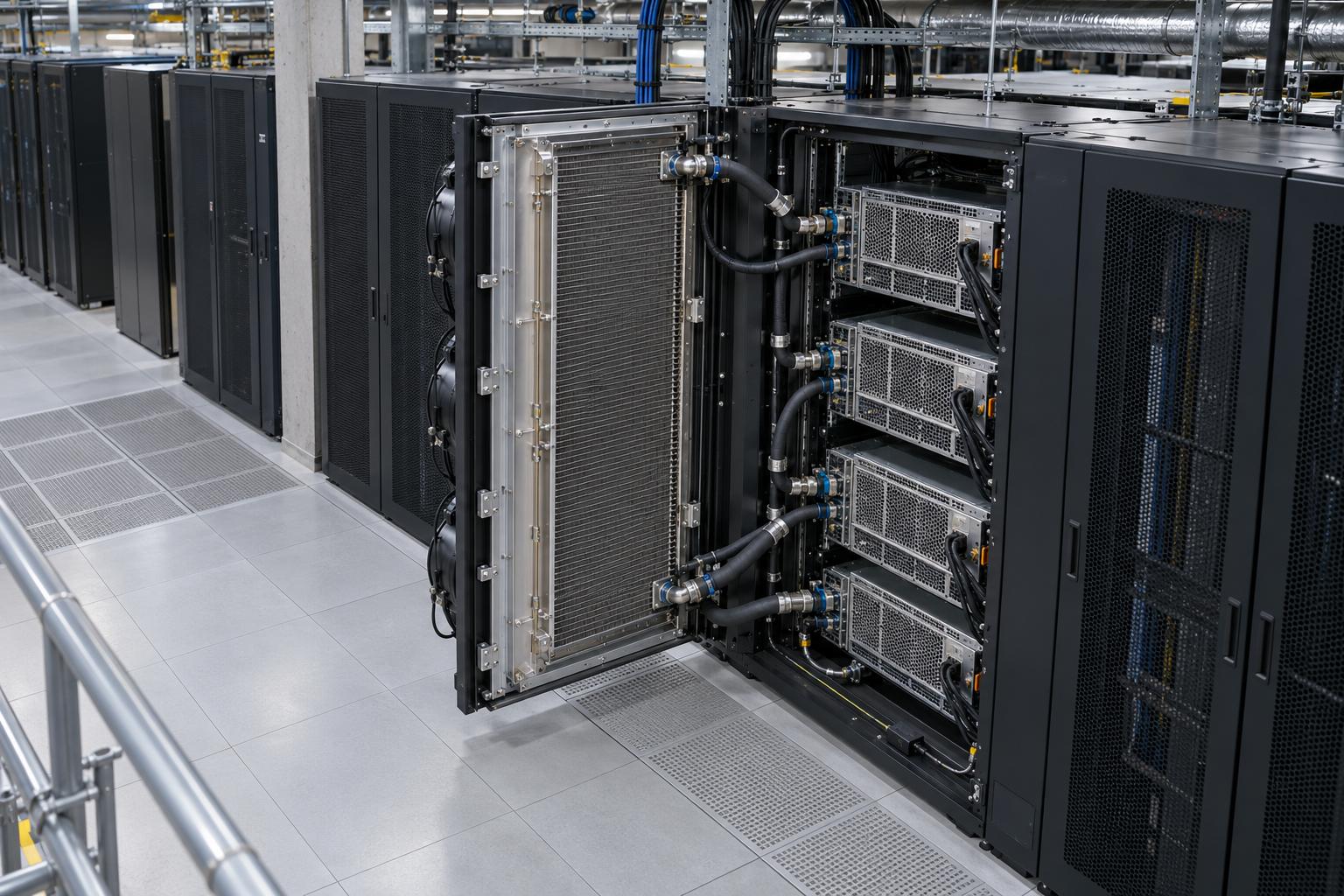
An RDHx is a water (or refrigerant) coil in place of the rack's rear door: server exhaust passes through it, heat moves into the fluid, and air leaves near room temperature. Schneider Electric describes it as a "bolt on solution" that "resembles a large, high-tech radiator," usable for air-cooled servers in a data center that already has an outdoor chilled water system [1]. The servers are unchanged.
Three variants matter:
- Passive. No fans in the door; server fans push air through the coil. The USystems ColdLogik CL21 Smart Passive datasheet states plainly that its "performance is entirely dependent on the active equipment inside the cabinet, and the available static pressure" [2].
- Active (fan-assisted). EC fans in the door overcome the coil's pressure drop. Motivair's ChilledDoor carries "up to 5 hot swappable centrifugal fans" and a PLC that tracks server air, room and entering water temperatures [3].
- Two-phase refrigerant. OptiCool's door uses a "proprietary two-phase refrigerant design" rather than water in the coil [4].
What an RDHx does not do: it does not cool chips better than the server's own heat sinks at a given inlet temperature, it does not take server fan power off your UPS, and it does not help liquid-only servers. Room airflow still matters for everything not behind a door; see containment strategies.
Capacity ratings are conditions, not constants
Every rating below is a vendor claim. The ones worth using state the air and water conditions behind them.
| Product (vendor claim) | Type | Rated capacity | Stated conditions |
|---|---|---|---|
| USystems ColdLogik CL21 Smart Passive [2] | Passive | 7 to 29 kW | 40°C air onto coil, 14°C water in, 20°C water out, 1,000 to 6,000 m³/h (589 to 3,531 cfm) |
| Same, warmer room | Passive | 5 to 22 kW | 35°C air onto coil, same water, same airflow range |
| Lenovo Rear Door Heat eXchanger V2 [5] | Server-fan driven | 30 to 40 kW load, % removal varies | 27°C inlet air, 18°C ±1°C water (ASHRAE Class 1), 22.7 to 56.8 L/min |
| Motivair ChilledDoor M4 to M16 [3] | Active | 12, 30, 45, 55, 65, 70 or 75 kW nominal by model | "Calculated at 35% RH and 75F Room Temp; Supply Temperature Range 55F - 65F water; 100% water"; 0 to 23 GPM |
| Vertiv Liebert DCD, 80 kW [6] | Passive door plus active fan module | 80 kW | 44.4°C air in, 25.8°C air out, 50% RH, 20°C water in, 28°C water out |
| OptiCool 120 kW RDHx [4] | Two-phase refrigerant | "up to 120kW per rack" | None stated in the release |
| ColdLogik RDHx [7] | Active | "up to 200kW of heat per rack" | None stated; sponsored article by a Legrand author |
Three things stand out. The Motivair line spans 12 to 75 kW by model, and only the largest reach 75 kW, at 55 to 65°F (12.8 to 18.3°C) supply water; Motivair's product page also says "up to 75kW" (checked 2026-10-28), while Schneider's blog quotes "up to 72 kW per rack." The passive CL21 loses about a quarter of its capacity when air onto the coil drops from 40°C to 35°C (29 to 22 kW at 6,000 m³/h), because a smaller air-to-water temperature difference moves less heat; hot GPU exhaust helps a door. And the 120 kW and 200 kW claims come without water temperature, airflow or fan power: ask for a performance table at your conditions before planning on them.
The heat balance: check any door with two equations
The same steady-state energy balance applies on both sides of the coil:
Q = ṁ × cp × ΔT
- Air side: ṁ_air is mass flow in kg/s (volumetric flow × density), cp ≈ 1.006 kJ/(kg·K), ΔT is air temperature drop across the coil.
- Water side: ṁ_water in kg/s (1 L/s ≈ 1 kg/s), cp ≈ 4.186 kJ/(kg·K), ΔT is water temperature rise.
Assumed air density: about 1.13 kg/m³ at 40°C and 1.17 to 1.18 kg/m³ near room temperature (textbook values).
Sanity check 1: CL21 at 29 kW. 6,000 m³/h is 1.667 m³/s; × 1.13 kg/m³ = 1.88 kg/s of air. ΔT_air = 29 / (1.88 × 1.006) = 15.3 K, so air leaves at about 40 − 15.3 = 24.7°C, close to a typical room. Water: 29 / (4.186 × 6 K) = 1.155 kg/s = 4.16 m³/h. The datasheet lists 4.2 m³/h. The table is internally consistent.
Sanity check 2: Vertiv DCD at 80 kW. ΔT_air = 44.4 − 25.8 = 18.6 K. ṁ_air = 80 / (1.006 × 18.6) = 4.28 kg/s, about 3.65 m³/s or roughly 7,700 cfm. Water: 80 / (4.186 × 8 K) = 2.39 kg/s, about 143 L/min or 38 US gpm. That airflow is why the 80 kW configuration adds an active fan module.
Worked GPU example (hypothetical rack). NVIDIA rates the air-cooled DGX B200 at "~14.3 kW max" in 10 RU [8]; the DGX B200 user guide lists airflow of 1,550 CFM and a maximum weight of 142.4 kg [9]. Assumption: maximum power and listed airflow coincide, which is a conservative simplification; real airflow varies with fan control and inlet temperature.
Per node, air side:
- 1,550 cfm ÷ 2,118.9 = 0.732 m³/s.
- × 1.18 kg/m³ (25°C inlet) = 0.863 kg/s.
- ΔT_air = 14.3 / (0.863 × 1.006) = 16.5 K.
- With a 25°C inlet, exhaust onto the coil is about 41.5°C.
Rack of four nodes: 4 × 14.3 = 57.2 kW and 4 × 1,550 = 6,200 cfm (about 10,530 m³/h).
Passive door test (CL21 table, 40°C air on). The table tops out at 6,000 m³/h. One node (about 2,630 m³/h) interpolates to roughly 15.5 kW of door capacity, just above 14.3 kW. Two nodes (about 5,270 m³/h) interpolate to roughly 26 kW against 28.6 kW of load, so a passive door of this class is at or past its limit with two DGX-class nodes, before accounting for the extra 40 to 55 Pa of coil pressure drop the server fans must overcome at those flows. Four nodes is off the table entirely.
Active door test (Motivair M16, 75 kW nominal, 0 to 23 GPM).
- 23 GPM × 3.785 / 60 = 1.45 L/s ≈ 1.45 kg/s.
- Water ΔT at 57.2 kW = 57.2 / (1.45 × 4.186) = 9.4 K.
- At 60°F (15.6°C) supply, return is about 25°C.
- If your loop is designed for an 8 K rise, the rack needs 57.2 / (4.186 × 8) = 1.71 kg/s, about 102 L/min or 27 gpm, more than the 23 GPM ceiling in the brochure. Either accept a wider ΔT or pick a door and valve sized for it.
Result: four DGX B200-class nodes (57 kW) fit inside an active 70 to 80 kW door's vendor rating if you can deliver about 23 to 27 gpm per rack at 13 to 18°C. A fifth node (71.5 kW) uses almost all the margin. Weight is the other limit: four nodes at 142.4 kg is 570 kg before the rack, PDUs and a door that Vertiv lists at 160 kg (353 lb) for the DCD80.
Which GPU racks fit
- Fits an active door: air-cooled 8-GPU HGX/DGX-class servers at three to four per rack, PCIe GPU servers (L40S, H100 PCIe class), and the "mid-density" inference racks for which Schneider says air-cooled solutions "can support densities up to 72 kW per rack" [1].
- Marginal: five DGX-class nodes (71.5 kW), or any rack whose server airflow exceeds the door's rated airflow.
- Does not fit: GB200 NVL72, which NVIDIA describes as a "rack-scale, liquid-cooled design" with 36 Grace CPUs and 72 Blackwell GPUs at "approximately 120kW" per rack (NVIDIA GB200 NVL72, DGX GB200 user guide), and GB300 NVL72, described as "a fully liquid-cooled, rack-scale architecture" [10]. A door can only take their residual air heat.
- Three to four air-cooled HGX/DGX-class servers per rack fit an active door.
- Five DGX-class nodes or airflow above the door's rating is marginal.
- NVL72-class systems and racks that ship only with cold plates need a liquid cooling path.
- In hybrid racks, a rear door can take air heat from memory, power supplies, NICs and drives.
The ASHRAE point cuts against RDHx long term: server fans still run on your UPS.
Water side requirements
Loop isolation. Schneider recommends a liquid-to-liquid coolant distribution unit (CDU), in-rack or serving multiple racks, which "creates isolated liquid loops": a primary loop on facility chilled water and a secondary loop circulating to the doors. Vertiv notes the DCD "can be supplied by either the existing chilled water system or by a coolant distribution unit." A CDU also gives one point to hold supply temperature above dew point.
Temperature class. ASHRAE TC9.9 renamed its liquid cooling classes by upper supply temperature limit: W17 (previously W1), W27 (W2), W32 (W3), W40 (new), W45 (W4) and W+ (W5), all with a 2°C lower limit [11]. The door ratings above sit in W17 to W27 territory: Motivair at 12.8 to 18.3°C, CL21 at 14°C, Lenovo at 18 or 22°C, Vertiv at 20°C. Warmer water widens free-cooling hours but cuts capacity, because it shrinks the air-to-water gap; Schneider's claim that RDHx "can also use warmer inlet water temperatures" needs a derating table behind it.
Flow and pressure. Size piping, valves and pumps for the per-rack flow from the heat balance (27 gpm per 57 kW rack at 8 K rise) plus coil pressure drop (CL21: 18 to 30 kPa at its upper flows).
Condensation and dew point
A coil colder than the room's dew point condenses water behind a rack of power supplies. The fix is keeping supply water above dew point at all times.
- Lenovo's door specification lists the water temperature requirement as "Above dew point." It allows a given supply temperature only "if the system that is supplying the water is able to measure the room dew point and automatically adjust the water temperature accordingly"; otherwise "the water temperature must be above the maximum dew point that is allowed at that data center installation" [5].
- Motivair says the ChilledDoor "operates above the ambient dew point"; Vertiv describes a "Non-condensing heat exchanger."
- ASHRAE's recommended envelope tops out at a dew point of 15°C (59°F) [11].
Check the vendors' own rating points (dew points computed with the Magnus approximation; derived, not vendor figures):
| Rating point | Room condition | Room dew point | Supply water | Margin |
|---|---|---|---|---|
| Motivair | 75°F (23.9°C), 35% RH | about 7.5°C | 12.8 to 18.3°C | about 5 to 11 K |
| Vertiv DCD80 | 25.8°C, 50% RH | about 14.6°C | 20°C | about 5.4 K |
| CL21 | not stated | n/a | 14°C | below ASHRAE's 15°C max dew point |
The last row is the trap: 14°C water is fine in a dry hall but below dew point if the room drifts to ASHRAE's recommended maximum. Either hold humidity well under that limit or let a CDU raise supply temperature with dew point and accept the capacity loss. Add leak detection at every door.
Stranded capacity: the real reason to retrofit
Legacy halls usually run out of cooling before power or floor. ASHRAE notes that best-of-breed raised floors deliver about 1,900 cfm per tile, while airflow for a 40 to 50 kW rack "could be up to 5000 cfm," and that "many data centers ... gradually depopulate IT equipment as they refresh their racks to fit within legacy power or cooling levels." The four-node example needs 6,200 cfm, over three best-case tiles.
With doors, exhaust leaves near room temperature, so CRAH units no longer absorb it and stranded UPS and floor capacity becomes usable. The one published retrofit figure we found is vendor-authored: at the University of Cambridge's West Cambridge Data Centre, ColdLogik doors were part of a hybrid strategy that raised cabinet density "from approximately 30kW to 44kW per rack" and hall capacity "from 900kW to 1.2MW" [7]. That is a 33% hall uplift, possible only with electrical headroom.
Hybrid: RDHx plus direct-to-chip
Cold plates take most of the heat; memory, power supplies, NICs and drives still reject heat to air. A rear door can take that residual, and this is not new: ASHRAE cites TACC's Frontera, whose nodes have "CPUs, direct liquid cooled, and rest of the system air cooled with a rear door heat exchanger (RDHX) in the rack." Motivair markets an "Air-Assisted Liquid Cooling" mode that integrates a water loop for DLC servers with the door [3].
How big is the residual at the top end? Schneider's Helios reference design with AMD targets racks "up to 246 kW per rack" with a liquid-first architecture where "84% of heat removed via liquid, 16% via air" [12]. 246 × 0.16 = 39 kW of air-side heat per rack, a load inside the active door ratings above. But 246 kW is the rack, not a door rating, and the Helios material we reviewed does not specify a rear door for that air fraction.
The cold-plate side of a hybrid rack has its own acceptance tests; see cold-plate commissioning.
Efficiency claims, read carefully
- Schneider: "Traditional air cooling is 30-60% less efficient than cooling with an RDHx." Vendor claim, no baseline given.
- Motivair: data center efficiencies "can be increased by up to 90%." Vendor claim, no method given.
- ASHRAE (vendor-neutral): server fan power of "10% to 20% is not uncommon for some of the denser servers"; "In a 50 kW rack, the fan power translates to be at least 5 kW," and raising fan share from 2% to 10% "equates to reducing the data center UPS capacity by 8%."
The ASHRAE point cuts against RDHx long term: server fans still run on your UPS. On the four-node example, 10 to 20% fan share is 5.7 to 11.4 kW of UPS capacity spent on air movement inside the servers, which direct-to-chip cooling would largely recover.
Retrofit checklist
- Heat balance per rack: kW, server airflow and exhaust temperature against the door's table at your water temperature.
- Water: plant capacity, supply temperature, CDU or direct feed, per-rack flow and pressure drop, water quality.
- Dew point: room humidity control, dew-point-tracking supply temperature, alarm thresholds.
- Structure: rack plus servers plus wet door weight (CL21 wet weight 87.8 to 125.4 kg; Vertiv DCD80 160 kg); see rack floor loading.
- Clearance: door depth (CL21 198 mm) and swing (Motivair 95°, Vertiv 135°) against aisle width; ASHRAE notes aisle pitches "may need to accommodate additional spacing for RDHXs."
- Hoses: top or bottom feed, quick connects, routing, leak detection under each rack.
- Power and controls: door fan power (up to 3,000 W max on Motivair's M14-6), A/B supplies, fan-failure behaviour.
- Commissioning: load test at design water temperature, logging air-off temperature and dew point.
- 01Balance heat per rack
Check rack load, server airflow and exhaust temperature against the door's table at the available water temperature.
- 02Size the water supply
Confirm plant capacity, supply temperature, loop arrangement, flow, pressure drop and water quality.
- 03Control dew point
Check humidity control, supply temperature tracking and alarms to keep supply water above room dew point.
- 04Commission under load
Load test at design water temperature while logging air-off temperature and dew point.
When RDHx is the wrong answer
- Racks designed for liquid: NVL72-class systems and anything else that ships only with cold plates.
- Air-cooled racks above about 70 to 80 kW: beyond the conditioned ratings we could verify; 120 to 200 kW claims lack published conditions.
- No chilled water: Schneider points to a heat dissipation unit (HDU, "up to 150 KW per rack") for liquid-cooled servers, which rejects heat into the room and "does put an extra burden on the data center's air-cooling system."
- Humid halls without dew point control.
Decision table
| Per-rack load (air-cooled IT) | Chilled water available | Practical choice |
|---|---|---|
| Up to about 20 kW | Either | Containment and existing CRAH; passive door if hot spots |
| About 20 to 30 kW | Yes | Passive or active RDHx; check server fan static pressure |
| About 30 to 75 kW | Yes | Active RDHx with CDU and dew-point control |
| About 30 to 75 kW | No | Bring water to the row first; a door needs a water source |
| Above about 75 to 80 kW, or liquid-only servers | Yes | Direct-to-chip; RDHx only for the residual air fraction |
Thresholds are heuristics derived from the ratings above, not standards. For the wider architecture choice see GPU data center cooling design. GPU Smith helps teams run this kind of per-rack heat and water balance before committing to a door or a CDU.
Sources
- Upgrade legacy data centers for AI workloads with RDHx liquid cooling, Schneider Electric blog, Nov 11, 2025 (accessed 2026-10-28)
- The ChilledDoor Rack Cooling System brochure, Motivair by Schneider Electric, 2025 (accessed 2026-10-28)
- ColdLogik CL21 Smart Passive data sheet, USystems / Legrand, 2023 (accessed 2026-10-28)
- Vertiv 360AI Solution Design Specifications, Model 1X80, Vertiv, 2025 (accessed 2026-10-28)
- OptiCool launches industry's highest capacity 120kW rear door heat exchanger, OptiCool Technologies, Sep 8, 2025 (accessed 2026-10-28)
- Debunking myths about rear door heat exchangers in modern data centers, DCD (sponsored, Klaus Dafinger, Legrand), Jan 31, 2026 (accessed 2026-10-28)
- Rear Door Heat eXchanger V2, Lenovo documentation (accessed 2026-10-28)
- Emergence and Expansion of Liquid Cooling in Mainstream Data Centers, ASHRAE TC9.9 white paper, 2021 (accessed 2026-10-28)
- NVIDIA DGX B200, NVIDIA (accessed 2026-10-28)
- Introduction to NVIDIA DGX B200, DGX B200 User Guide, NVIDIA (accessed 2026-10-28)
- NVIDIA GB200 NVL72, NVIDIA (accessed 2026-10-28)
- Traditional AI infrastructure models are reaching operational limits at AI factory scale, Schneider Electric blog, Aug 5, 2026 (accessed 2026-10-28)
- NVIDIA DGX GB200 User Guide: Hardware, NVIDIA, updated 2026-09-17 (accessed 2026-10-28)
- NVIDIA GB300 NVL72, NVIDIA (accessed 2026-10-28)
- ChilledDoor Rack Cooling System, Motivair by Schneider Electric product page (accessed 2026-10-28)
External Sources (12)
About
GPUSmith
Plan and build private AI compute with GPU Smith. We connect workload requirements with GPU hardware, networking, deployment and operating decisions so your infrastructure fits the work it must perform.
GPU Smith provides independent engineering and research for private AI infrastructure. We help technical buyers and operators reason about GPU workload sizing, hardware selection, procurement, deployment and inference operations, from the compute system to the networking, power and cooling requirements around it.
Start with the workload
Useful infrastructure decisions begin with the models, data, throughput, latency and operating constraints a team actually has. GPU Smith helps connect those requirements with system design and deployment choices. The goal is a privately controlled AI environment whose capacity and operational demands are understood before a purchasing decision.
Hardware and supplier research
Our public reference library covers GPUs, complete systems and networking components. The server-vendor directory and manufacturing research help teams investigate suppliers, compare options and follow sources behind technical claims. We distinguish manufacturer specifications from measured benchmarks and advertised capabilities from tested configurations. Reference pages are research resources, not a live inventory listing or a binding equipment quote.
Deployment and operations
GPU Smith's engineering scope includes infrastructure integration, networking, power, cooling and the practical operation of inference workloads. Our published articles explain the tradeoffs behind deployment, procurement and ongoing operations so teams can ask better questions and document decisions.
Work with GPU Smith
Explore the hardware library, GPU references, networking references and vendor research. Contact GPU Smith with your workloads and deployment constraints to discuss a project and confirm current scope, pricing and availability.
Inclusion of a manufacturer or product in our research does not imply a partnership, certification or endorsement.
Disclaimer
This document is provided for informational purposes only. No representations or warranties are made regarding the accuracy, completeness, or reliability of its contents. Any use of this information is at your own risk. GPUSmith shall not be liable for any damages arising from the use of this document. This content was generated with assistance from artificial intelligence tools, which may contain errors or inaccuracies. Readers should verify critical information independently. All product names, trademarks, and registered trademarks mentioned are property of their respective owners and are used for identification purposes only. Use of these names does not imply endorsement. This document does not constitute professional or legal advice. For specific guidance related to your needs, please consult qualified professionals.