GPUSmith Article
RTX 5090 in the Data Center: EULA, P2P, Cooling vs RTX PRO
What the GeForce driver license says about datacenter use, RTX 5090 limits (no NVLink, no official P2P, 575 W), and how RTX PRO 6000 Server compares.
Summary
- 01The RTX 5090 offers high memory bandwidth, but its 32 GB capacity leaves less room for weights, KV cache, activations and runtime reserve than the 96 GB RTX PRO 6000 Server Edition.
- 02The GeForce driver license restricts datacenter deployment of the software. Owning or racking the card does not settle the licensing question, and the agreement does not define datacenter deployment.
- 03The RTX 5090 has no NVLink, and PCIe P2P remains unofficial. Published patch measurements come from one system; topology and framework behavior need testing on the actual deployment.
- 04For capacity-bound serving, the article's arithmetic shows that the consumer route nearly triples heat per GB. Cooling, chassis clearance, power cabling and redundancy all affect server suitability.
- 05GDDR7 on GeForce includes always-enabled on-die ECC, while the Server Edition lists ECC support. The article found no NVIDIA comparison of error reporting, so monitoring counters need verification.
Inside this article
Why the RTX 5090 gets considered for servers
The case for the GeForce RTX 5090 in a server is simple arithmetic. It has 32 GB of GDDR7 on a 512-bit bus [1] and 1,792 GB/s of peak memory bandwidth [2], on the same Blackwell generation as NVIDIA's professional cards. The RTX PRO 6000 Blackwell Server Edition has three times the memory (96 GB GDDR7 with ECC) but less bandwidth: 1,597 GB/s [3]. For bandwidth-bound decode on a model that fits in 32 GB, the consumer card looks hard to beat on paper.
This article lists what that arithmetic leaves out: the driver license, missing NVLink and unofficial PCIe peer-to-peer, memory per watt, cooling, power connectors and support. No benchmark claims; every figure is a vendor specification, a labelled third-party measurement or our arithmetic with inputs shown. Prices are omitted.
What the GeForce license says
The GeForce driver is distributed under the "NVIDIA Driver License Agreement", version dated February 25, 2025 as checked on 2026-10-28. Section 2.8 reads, verbatim [4]:
"You agree that GeForce or Titan SOFTWARE: (i) is licensed for use only on GeForce or Titan hardware products you own, and (ii) is not licensed for datacenter deployment."
Other relevant clauses:
- 2.7: no "commercial hosting services with the SOFTWARE", and no selling, renting or sublicensing it, except as expressly allowed.
- 2.3 and 2.6: no modifying binary-form software, and no bypassing "any technical limitation" in it.
- 1.1(c): you may "Deploy, for your own use, the SOFTWARE on infrastructure you own or lease". Read with 2.8, owning the hardware does not settle the datacenter question.
- 7: the agreement terminates automatically on non-compliance.
Three points keep this in proportion.
- The clause restricts the software, not the card. Nothing stops you buying or racking an RTX 5090. But CUDA workloads need NVIDIA's user-space driver, so the restriction matters for production use.
- "Datacenter" is not defined. The word appears once. The clause arrived in January 2018 with an exception, "except that blockchain processing in a datacenter is permitted", which the current text no longer has. An NVIDIA spokesperson then said "data centers typically are larger-scale deployments, often in multi-server racks, that provide access to always-on GPUs to many users", and that NVIDIA did not intend to prohibit research uses "that do not operate at data center scale" [5]. A 2018 press statement is not a contract term.
- This is not legal advice. Whether a closet server, a colocation half-rack or a shared endpoint is "datacenter deployment" is a question for counsel, against the license version you accepted.
Hardware limits in the data sheet
| Item | GeForce RTX 5090 (Founders Edition) | RTX PRO 6000 Blackwell Server Edition |
|---|---|---|
| Memory | 32 GB GDDR7, 512-bit | 96 GB GDDR7 with ECC, 512-bit |
| Peak bandwidth | 1,792 GB/s (whitepaper) | 1,597 GB/s |
| Power | 575 W total graphics power | up to 600 W, configurable (300 W minimum) |
| Aux power | 4x 8-pin via adapter, or 1x 600 W PCIe Gen 5 cable | 1x PCIe 16-pin (CEM 5.1) |
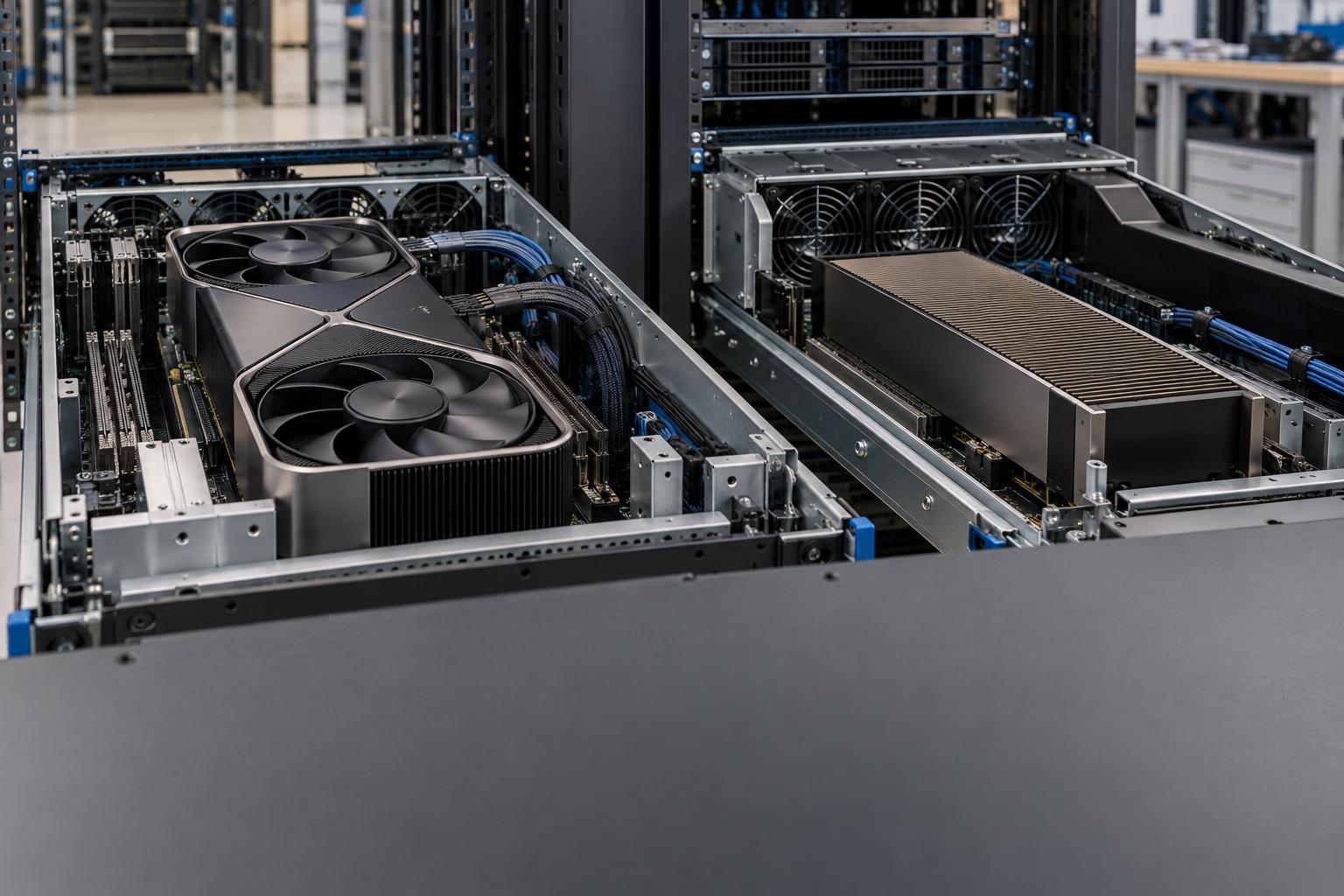
| Cooling | active, "Double Flow Through" fans | passive, needs chassis airflow |
| Size | 304 x 137 mm, 2-slot | FHFL 10.5 in, dual-slot |
| NVLink | No | Not supported |
| MIG | not listed | up to 4 instances |
| SR-IOV / vGPU | not listed | 48 VFs; vGPU 19.0 or later |
Sources: NVIDIA RTX 5090 page, RTX Blackwell whitepaper, and the RTX PRO 6000 Server Edition product brief SP-12355-001_v02, June 2025 (an NVIDIA document hosted by PNY).
The 5090 page lists 1,000 W required system power, but its install checklist gives lower minimums (an 850 W PSU, three 8-pin leads, since the "card supports 3x or 4x PCIe 8-pin cables", or a 450 W cable) and asks for clearance for a "3-slot card (61mm)" plus 36 mm for cables (rechecked 2026-10-28). The checklist reads as a floor, the spec table as full 575 W operation. Design to the spec table, then confirm against the specific partner card.
- 32 GB GDDR7 on a 512-bit bus; 1,792 GB/s peak bandwidth.
- 575 W total graphics power; adapter or PCIe Gen 5 cable for auxiliary power.
- Active Double Flow Through fans; no NVIDIA server airflow specification found in the article.
- No NVLink; MIG and SR-IOV / vGPU are not listed.
- 96 GB GDDR7 with ECC on a 512-bit bus; 1,597 GB/s peak bandwidth.
- Up to 600 W configurable power, with a 300 W minimum; one PCIe 16-pin connector.
- Passive cooling requires chassis airflow, with specified fully ducted airflow requirements.
- NVLink is not supported; up to 4 MIG instances and 48 VFs are listed, with vGPU 19.0 or later.
Peer-to-peer and multi-GPU scaling
With no NVLink, every byte exchanged between two 5090s crosses PCIe. PCIe 5.0 delivers 32 GT/s per lane and "up to 128 GB/s via x16 configuration", counting both directions [6]. That is far below the NVLink bandwidths compared in our NVLink vs Infinity Fabric article.
With CUDA peer-to-peer (P2P), one GPU writes directly into another's memory. Without it, NCCL falls back to shared memory: "SHM is used between devices when peer-to-peer cannot happen, therefore, host memory is used" [7].
Official status. The 5090 spec page does not mention P2P. A March 2025 reply in an NVIDIA developer forum thread states "RTX 50-series are Geforce GPU series , and p2p is not supported for GPU<->GPU P2P" [8]. The poster's role is not shown, so treat it as indicative, not formal documentation.
The unofficial patch. tinygrad's fork of NVIDIA's open GPU kernel modules ("NVIDIA Linux open GPU with P2P support") explains that the legacy mailbox P2P mechanism is "not present or disabled in hardware on the 4090s". It instead maps all of VRAM into the large BAR1 aperture, reusing H100 code paths, and needs large-BAR support with the IOMMU off [9]. Its newest branch targets driver 570.148.08.
A downstream fork by aikitoria (last pushed 2026-10-26) targets driver 615.78.08 and claims RTX 30-, 40- and 50-series support. It needs Resizable BAR and IOMMU passthrough, and warns that iommu=pt "removes DMA isolation" [10]. The kernel modules are MIT / GPLv2 dual-licensed [11], but the fork's mixed-generation mode patches the proprietary libcuda binary, which clauses 2.3 and 2.6 address. Ask counsel first. Frameworks may also refuse P2P: one practitioner had to override vLLM's capability check by hand [12].
One measured system. The aikitoria README publishes p2pBandwidthLatencyTest output from one host (8x RTX 5090 plus one RTX PRO 6000, dual EPYC 9575F), not reproduced by us:
- unidirectional: about 43 GB/s with P2P disabled, about 56 GB/s with P2P writes enabled
- bidirectional: about 57 GB/s disabled, about 111 GB/s enabled
- GPU-side latency: about 14 µs disabled, about 0.4 µs enabled
Worked example: tensor-parallel traffic on two 5090s (derived)
Inputs: a Llama-3.3-70B-class model, hidden size 8,192, 80 layers [13], BF16 activations, TP=2. Assume two all-reduces per layer; in a two-GPU ring each GPU sends about one payload per all-reduce.
- Per token: 160 all-reduces x 8,192 x 2 bytes = 2.62 MB per GPU.
- Prefilling an 8,192-token prompt: 2.62 MB x 8,192 = 21.5 GB. That takes 0.38 s at 56 GB/s or 0.50 s at 43 GB/s.
- Decoding 32 concurrent sequences: 83.9 MB per step, or 1.5 ms (56 GB/s) to 2.0 ms (43 GB/s). Each step also pays the latency of 160 sequential collectives.
These are lower bounds on wire time, ignoring protocol overhead and overlap with compute. PCIe-only tensor parallelism hurts long prompts and tight inter-token latency targets most. Measure on your own topology: ACS settings and PCIe switch versus root-complex paths change the result.
You agree that GeForce or Titan SOFTWARE: (i) is licensed for use only on GeForce or Titan hardware products you own, and (ii) is not licensed for datacenter deployment.
Memory capacity and ECC
Weights-only fit, derived from parameters x bytes per parameter in decimal GB. The figures exclude KV cache, activations and runtime reserve, and use 4-bit = 0.5 byte/parameter, ignoring scale overhead.
| Model size, precision | Weights | 1x 5090 (32 GB) | 2x 5090, TP=2 (64 GB) | 1x PRO 6000 (96 GB) |
|---|---|---|---|---|
| 8B, BF16 | 16 GB | fits | fits | fits |
| 32B, FP8 | 32 GB | no headroom | fits, ~32 GB left | fits, ~64 GB left |
| 70B, 4-bit | 35 GB | no | fits, ~29 GB left | fits, ~61 GB left |
| 70B, FP8 | 70 GB | no | no | fits, ~26 GB left |
| 120B, 4-bit | 60 GB | no | ~4 GB left | fits, ~36 GB left |
For the 70B config above, BF16 KV cache costs 80 layers x 8 KV heads x 128 x 2 x 2 bytes = 327,680 bytes per token, or 2.68 GB per 8,192-token sequence. So ~29 GB on two 5090s holds about ten such sequences before overhead; ~61 GB on one PRO 6000 holds about twenty-two, with no PCIe hop. Our RTX PRO 6000 vs L40S analysis applies this logic to a purchase.
On ECC, NVIDIA states that on GeForce RTX cards with GDDR7, ECC is "built into the DRAM die itself and is always enabled", with single-bit error correction and Error Detection and Replay [2]. The Server Edition brief lists "ECC support: Enabled" [14]. We found no NVIDIA document comparing error reporting between the lines; verify the counters your monitoring needs (nvidia-smi -q -d ECC) on the actual card.
Cooling and density
The passive Server Edition needs at least 43 CFM of fully ducted airflow at a 25 °C inlet, rising to 125 CFM at 45 °C, "whenever input power is provided to the card", in either direction [14]. Server vendors qualify chassis fans against those numbers. The 5090 Founders Edition instead uses its own fans in a "Double Flow Through" design that NVIDIA calls "the highest-performance dual-slot graphics card cooler ever made" [1]. We found no NVIDIA server airflow specification for it.
Open-air coolers "tend to recirculate warm air inside the case", while blowers exhaust it out of the back of the case, which suits multi-GPU and server builds [15]. The same report covers unbranded "RTX5090 32G D7 Turbo" blower cards appearing in China. NVIDIA had not confirmed any such SKU, and the report notes that a blower "may struggle" with 575 W.
NVIDIA's dense-workstation option is the RTX PRO 6000 Max-Q: 96 GB, 300 W board power, one CEM5 16-pin connector, "Active" cooling [16], which Puget Systems describes as a blower suited to multi-GPU builds [17].
Height matters too: the full-height Max-Q is 4.4 in (111.8 mm), the 5090 FE 137 mm, about 25 mm taller (derived) before the 36 mm cable allowance. Check riser and lid clearance.
Worked example: memory per watt (derived)
- 5090: 575 W / 32 GB = 18.0 W per GB of GPU memory.
- PRO 6000 Server: 600 W / 96 GB = 6.25 W per GB.
- 192 GB of GPU memory: six 5090s = 3,450 W of board power, against 1,200 W for two Server Editions.
For capacity-bound serving, the consumer route nearly triples the heat per GB. Our rack power planning guide carries the calculation through to PDUs and cooling.
Power delivery in servers
The Server Edition takes one PCIe CEM 5.1 16-pin connector; the 5090 takes a 600 W PCIe Gen 5 cable or four 8-pin leads through NVIDIA's adapter. The 12V-2x6 revision of the 12VHPWR header lengthened the power pins and shortened the sideband pins, so the card sees open-open (0 W) until the plug is fully seated; ground/ground allows 600 W sustained and open/ground 450 W [18].
The Server Edition runs at 600 W with both sense lines grounded, caps at 450 W in the 301-450 W state, and "will not boot" below its default cap [14]. For 5090s, check whether the chassis harness provides native 16-pin cables with correct sense wiring or needs an adapter per card, and whether N+1 PSU redundancy holds at 575 W per GPU plus transients.
Warranty, support and drivers
NVIDIA's warranty page says GeForce cards bought through partners "are warranted by the partner", and Founders Edition cards by NVIDIA [19]. Read the specific partner's terms for commercial-use exclusions. In 2018, NVIDIA contrasted GeForce with its data center line's "three-year warranty covering data center workloads" [5].
The Server Edition brief lists:
- R575+ Linux and Windows drivers
- vGPU 19.0 or later
- NVIDIA AI Enterprise support with VMware
- secure boot
- NVIDIA-Certified Systems qualification
See NVIDIA AI Enterprise licensing for costs. The 5090 spec page lists none of these entries.
Decision table
- 01Resolve the license question
Ask counsel whether the deployment falls within the restriction, using the license version accepted.
- 02Budget full runtime memory
Treat the weights-only fit table as a starting point; account for KV cache, activations, runtime reserve and scale overhead.
- 03Measure the actual topology
Measure multi-GPU behavior on the deployment topology, including ACS settings and PCIe switch or root-complex paths.
- 04Check cabling and PSU redundancy
Verify native cables or adapters, correct sense wiring and whether N+1 PSU redundancy holds at GPU power plus transients.
| Situation | 5090 defensible? | Why |
|---|---|---|
| Developer workstation, one or two cards, under a desk | Generally yes | Not a datacenter deployment; fit and cooling are easy |
| Internal lab box, single model fits in 32 GB, no SLA | Possibly; check license with counsel | No P2P needed; cooling is manageable |
| Multi-tenant or customer-facing endpoint in a rack | Weak | Clause 2.8 and "commercial hosting" (2.7), no MIG or vGPU, no vendor support |
| 70B-class serving with long prompts | Weak | Needs TP over PCIe without official P2P; 96 GB card avoids the hop |
| Dense 4U/8-GPU node | Weak | Open-air coolers, 137 mm height, adapter cabling; passive cards are qualified for this |
FAQ
Do GPU clouds rent RTX 5090s? Yes. For example, Runpod's pricing page listed RTX 5090 instances on 2026-10-28. How a provider squares that with clauses 2.7 and 2.8 is between it and NVIDIA; it does not change your position for hardware you deploy.
Does using the open kernel modules avoid the EULA? No. The kernel modules are MIT/GPLv2, but CUDA still depends on NVIDIA's proprietary user-space driver, which is covered by the agreement quoted above.
Is a single 5090 in an office server "datacenter deployment"? The agreement does not say. NVIDIA's 2018 description pointed at multi-server racks serving many users, but that statement is not part of the license. Ask counsel.
For an independent review of a consumer-versus-professional GPU decision, see GPU Smith.
Sources
- NVIDIA Driver License Agreement (GeForce), v. February 25, 2025 — NVIDIA, accessed 2026-10-28
- NVIDIA GeForce RTX 5090 — NVIDIA, accessed 2026-10-28
- NVIDIA RTX Blackwell GPU Architecture whitepaper v1.1 — NVIDIA, accessed 2026-10-28
- NVIDIA RTX PRO 6000 Blackwell Server Edition — NVIDIA, accessed 2026-10-28
- NVIDIA RTX PRO 6000 Blackwell Server Edition GPU Accelerator product brief SP-12355-001_v02 — NVIDIA (hosted by PNY), June 2025, accessed 2026-10-28
- NVIDIA RTX PRO 6000 Blackwell Max-Q Workstation Edition datasheet — NVIDIA, accessed 2026-10-28
- NVIDIA RTX PRO 6000 Blackwell Max-Q Workstation Edition 96GB — Puget Systems, accessed 2026-10-28
- Nvidia: Using cheap GeForce, Titan GPUs in servers? Haha, nope! — The Register, 2018-01-03, accessed 2026-10-28
- NVIDIA warranty information — NVIDIA, accessed 2026-10-28
- tinygrad/open-gpu-kernel-modules (P2P README) — tinygrad, GitHub, accessed 2026-10-28
- aikitoria/open-gpu-kernel-modules — GitHub, branch 615.78.08-p2p, accessed 2026-10-28
- NVIDIA open-gpu-kernel-modules COPYING — NVIDIA, GitHub, accessed 2026-10-28
- P2P issue using two RTX 5090 GPUs — NVIDIA Developer Forums, 2025-03-13, accessed 2026-10-28
- NCCL environment variables — NVIDIA, accessed 2026-10-28
- Patching NVIDIA's driver and vLLM to enable P2P on consumer GPUs — smcleod.net, 2026-02-25, accessed 2026-10-28
- PCI-SIG Achieves 32GT/s with New PCI Express 5.0 Specification — HPCwire (PCI-SIG release), 2019-05-30, accessed 2026-10-28
- Llama-3.3-70B-Instruct config.json (mirror) — Hugging Face, accessed 2026-10-28
- Nvidia's RTX 5090 GPUs with blower-style coolers appear in China — Tom's Hardware, 2025-05-31, accessed 2026-10-28
- ATX v3.1 & PCIe CEM 5.1 are official — Hardware Busters, 2023-09-17 (updated 2023-09-30), accessed 2026-10-28
- Runpod pricing — Runpod, accessed 2026-10-28
External Sources (19)
About
GPUSmith
Plan and build private AI compute with GPU Smith. We connect workload requirements with GPU hardware, networking, deployment and operating decisions so your infrastructure fits the work it must perform.
GPU Smith provides independent engineering and research for private AI infrastructure. We help technical buyers and operators reason about GPU workload sizing, hardware selection, procurement, deployment and inference operations, from the compute system to the networking, power and cooling requirements around it.
Start with the workload
Useful infrastructure decisions begin with the models, data, throughput, latency and operating constraints a team actually has. GPU Smith helps connect those requirements with system design and deployment choices. The goal is a privately controlled AI environment whose capacity and operational demands are understood before a purchasing decision.
Hardware and supplier research
Our public reference library covers GPUs, complete systems and networking components. The server-vendor directory and manufacturing research help teams investigate suppliers, compare options and follow sources behind technical claims. We distinguish manufacturer specifications from measured benchmarks and advertised capabilities from tested configurations. Reference pages are research resources, not a live inventory listing or a binding equipment quote.
Deployment and operations
GPU Smith's engineering scope includes infrastructure integration, networking, power, cooling and the practical operation of inference workloads. Our published articles explain the tradeoffs behind deployment, procurement and ongoing operations so teams can ask better questions and document decisions.
Work with GPU Smith
Explore the hardware library, GPU references, networking references and vendor research. Contact GPU Smith with your workloads and deployment constraints to discuss a project and confirm current scope, pricing and availability.
Inclusion of a manufacturer or product in our research does not imply a partnership, certification or endorsement.
Disclaimer
This document is provided for informational purposes only. No representations or warranties are made regarding the accuracy, completeness, or reliability of its contents. Any use of this information is at your own risk. GPUSmith shall not be liable for any damages arising from the use of this document. This content was generated with assistance from artificial intelligence tools, which may contain errors or inaccuracies. Readers should verify critical information independently. All product names, trademarks, and registered trademarks mentioned are property of their respective owners and are used for identification purposes only. Use of these names does not imply endorsement. This document does not constitute professional or legal advice. For specific guidance related to your needs, please consult qualified professionals.